

Dynamics NAV – invoices from contracts
Dynamics NAV – invoices from contracts
Transactions among business partners usually have a contractual basis; most often in the contracts are clearly established the price, quantity and period of items and services delivery. When transactions are recurrent, it is beneficial for the provider to have contract information in a system which allows sales invoices to be generate easily.
In Microsoft Dynamics NAV it is possible to record contracts through Blanket Orders (for sale or purchase), where can be defined items pertaining to a contract. When items have to be delivered, from blanket order is generated a regular order, which follows the usual flow: delivery and invoicing.
Yet, this solution does not cover all the needs; one cannot trace costs/revenues associated to a contract, cannot know when the contract is due and must be invoiced, or when it expires.
A better solution for managing contracts is to use the functionalities from Jobs Module (Projects). Kepler Management Systems provides implementation and support services for Microsoft Dynamics NAV and use this functionalities to manage its contracts (with some specific customizations). Next, we will show to setup contracts and make the invoicing from Jobs Module.
Contract creation from Jobs Module
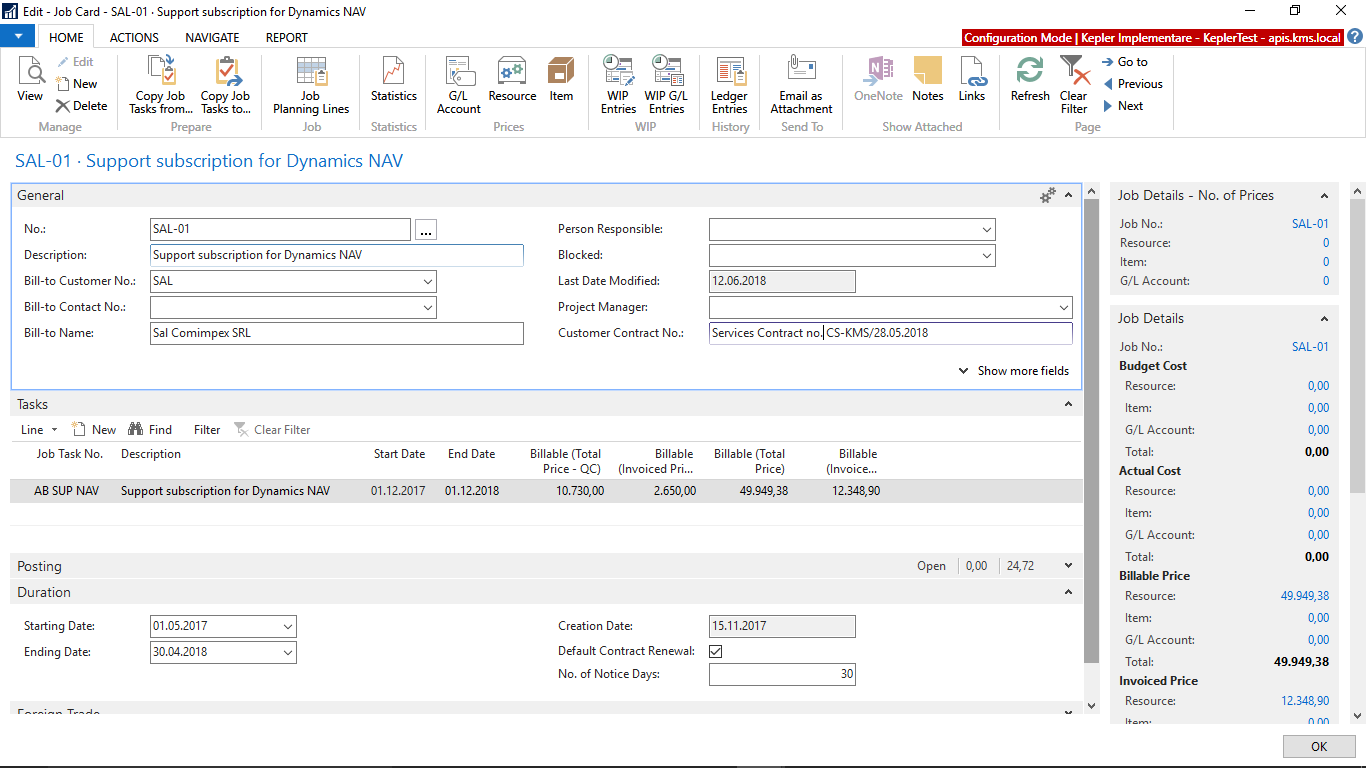
We can consider the contract as a job and for each contract we will define a job. On the job card we will input contract’s elements: customer, contract number, starting date, ending date, contract’s object. The picture bellow shows a job card for a Dynamics NAV support contract.
Creating invoice elements from contract
On jobs you can define various tasks (steps of the project) and on each task you can define job planning lines, containing the resources consumed and which will be invoiced to the customer. If services are recurrent, lines for invoicing may be created automatically, by a procedure. In the picture bellow there are created lines for a Dynamics NAV support subscription on 2018. There are entered starting date, invoicing period, resource to be invoiced, quantity and price.

After executing the procedure, lines to be invoiced will be created for the whole period defined.

Invoicing contracts
Invoicing of the contract can be made easily in the Jobs Module. The “Project Manager” Role Center displays a cue with all the invoices due, and the procedure “Job Create Sale Invoice” will issue all the sales invoices due at a certain moment.
Invoices will be available in Sales & Marketing Module. There a final check can be made to the invoice, and then can be posted in accounting.

Benefits of using invoicing from contracts in the Jobs Module
By following the flow described above, you can have the following benefits:
- A clear tracking of the contracts into the ERP system, with all its elements: customer, duration, price, invoiced value, remained value etc. Once a contract is completed, all the information is available for history.
- Easy invoicing. After you have defined job planning lines through automatic procedure, contracts’ invoicing can be made at once. You have the possibility to draft the contract in foreign currency, but the invoicing will be in local currency, the conversion is realized by the system.
- Tracing profitability of the contract. On a contract you can record costs, including invoices of the subcontractors. In the Jobs Module there are reports showing profitability per job.
- Budgeting for costs and revenues. You can budgets costs on revenues on a contract, and then you can compare budgeted amounts with realized amounts.
If you are looking for more Dynamics NAV knowledge, please check here: Dynamics NAV (Navision) Resources





Leave a Reply
Want to join the discussion?Feel free to contribute!